AMEX - 33% Faster Debugging with
Cloud Console Redesign
Modernizing a fragmented ecosystem of legacy tools into a unified, high-performance development platform for a Fortune 100 leader.

Tools
UXPin, Sketch, Invision
Deliverables
Responsive Web
Team
1 Lead, 3 Designers, 1 Researcher
Duration
12 Weeks
🌎 OVERVIEW
Amex developers were struggling with a "tool sprawl" of legacy and industry-standard software (Bitbucket, Jenkins, Splunk, ServiceNow) that slowed down the ship cycle.
We were brought in to build a custom, hybrid development platform that integrated these legacy giants into a modern, Kubernetes-ready engine and
Minimize delays in approvals, monitoring, and issue resolution
Reduce reliance on customer support and make troubleshooting workflows clear
Replaced outdated systems with a streamlined, role-tailored experience
🚧 CHALLENGE
Despite their technical capabilities, developers faced friction in completing daily tasks due to:
Onboarding Friction: The legacy system was so complex that new engineers faced a 1 - 2 month learning curve before they could contribute code effectively.
The Troubleshooting Void: When a deployment failed, the system offered no explanation. This "Black Box" effect forced engineers into hours of manual, high-stress debugging.
Support Team Burnout: Because documentation was disorganized and the UI was opaque, developers flooded the support team with preventable tickets, creating a massive organizational bottleneck.
Information Silos: Critical data (like system health and approval statuses) was hidden in different apps, making it impossible for developers to get a "pulse" on their projects quickly.
📌 MY ROLE
As a Associate UX Designer, I was responsible for:
Collaborating closely with product managers, researchers, and developers
Translating user needs into scalable designs and flows
Analyzing the usability tests and extracting the insights
Jump to Visuals
🔍 Discovery
We conducted market analysis, in-depth interviews with internal developers to identify pain points. We cross-referenced these with service tickets to see where the support team was getting overwhelmed.
📊 MARKET ANALYSIS INSIGHTS
Market analysis on other developer tools like Amazon Web Services (AWS), Google Cloud Platform (GCP), Heroku, and Digital Ocean, helped us gain insights on best practices to enhance the existing system.
🧾 Clear and Helpful Documentation
Even though developer tasks can be complex, top platforms made sure users never felt lost. They included clear labels, helpful tips, and direct links to guides right inside the tool.
🎨 Consistent Design Across the Platform
AWS and Google Cloud used one consistent design style across all their tools. This made it easier for users to understand how things work without needing to relearn new layouts or actions each time.
🚀 Simple and Guided Workflows
From starting a new project to launching it, leading platforms guided users step-by-step. This reduced confusion and helped users complete tasks quickly.
🧐 USER RESEARCH INSIGHTS
We interviewed internal developers and reviewed past feedback and support tickets to uncover key pain points and improvement opportunities in the platform.
😕 The lack of visual consistency slowed developers down, highlighting the need for a unified design language.
🔄 Devs had to switch between the platform and scattered docs, often turning to support teams, causing backlogs of support requests.
⏳ Console updates lacked clear communication, and approvals were delayed due to high workload of support team.
✎
Design Doing
We conducted a Product Roadmap Workshop to prioritize 10 primary developer scenarios, including pipeline setup, monitoring, and troubleshooting.
✏️ INFORMATION ARCHITECTURE, USABILITY TESTING
I designed two distinct structural variations for the landing screen: a Tabular approach (horizontal data tasks) and a Kanban approach (vertical workflows).
Usability testing with 8 in-house developers revealed a strong preference for the Tabular approach, as it allowed them to scan critical system statuses quickly while keeping deep technical details available on demand.
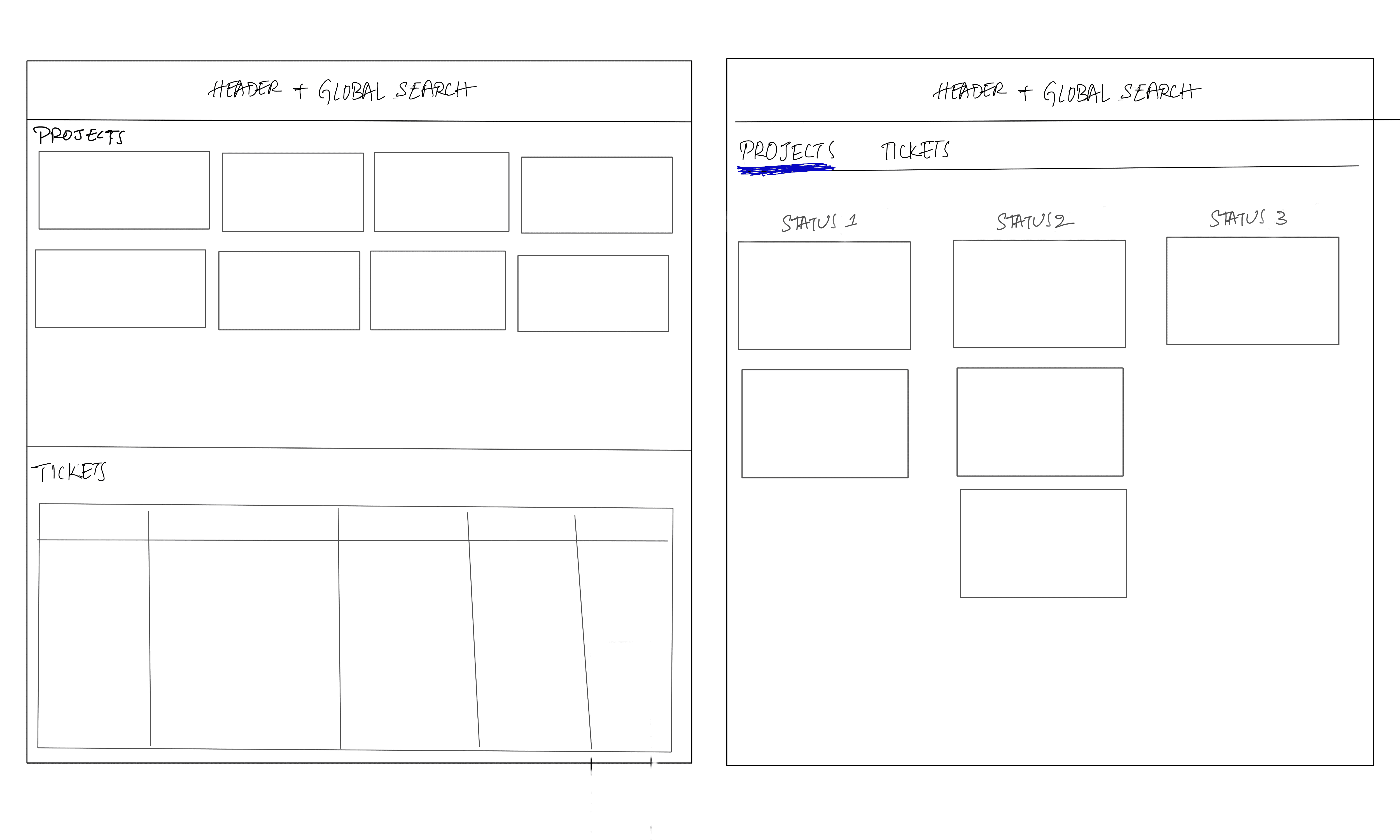
Fig 1.0: Rough information architecture of 2 variations for landing screen that was tested with developers in usability testing
Tested wireframe prototypes across different scenarios like application decommissioning and real-time troubleshooting.
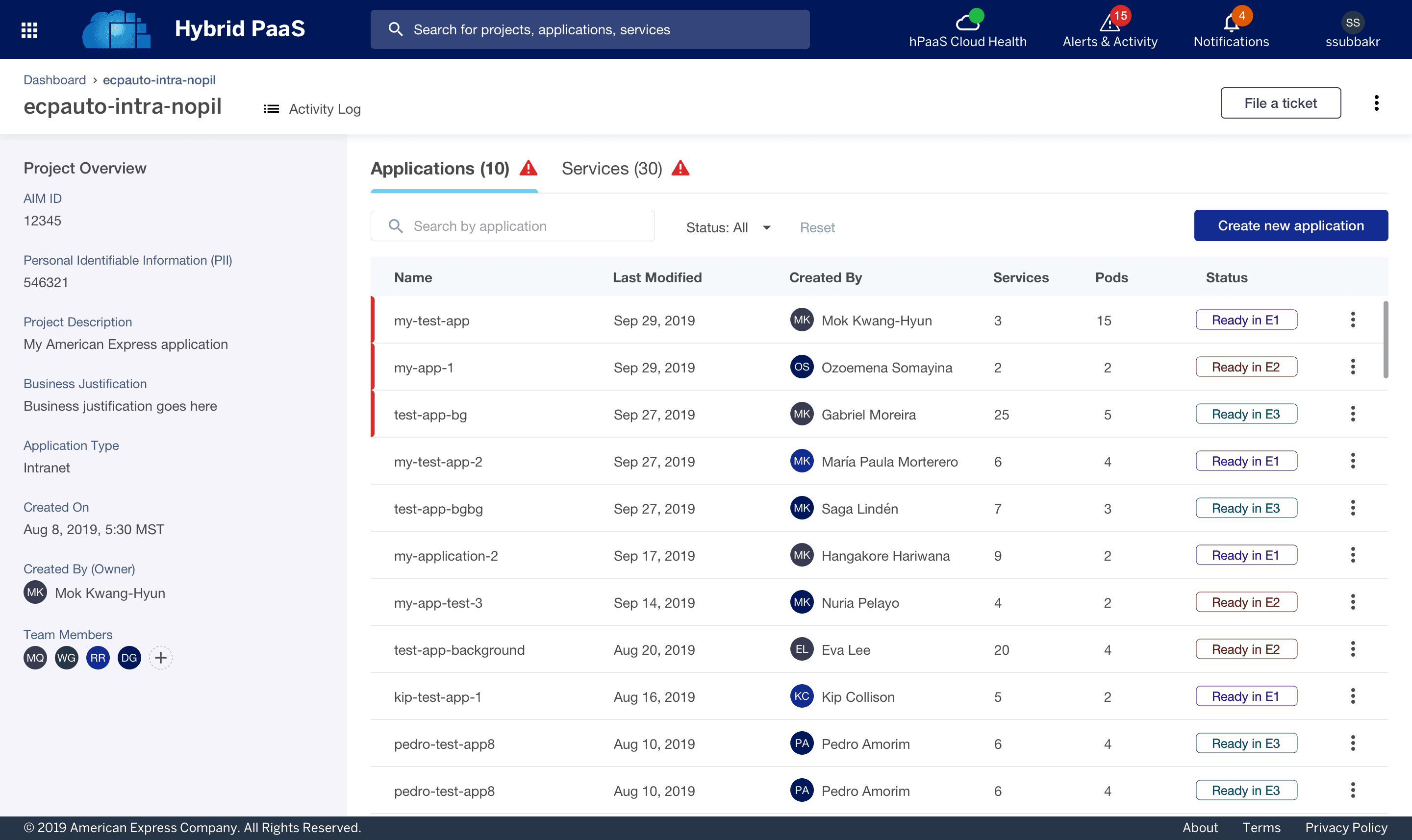
Feedback was used to refine the visual hierarchy of the Application and Services tables, ensuring that "System Health" alerts were visually prioritized to reduce "tab-switching" during outages.
Finalized the UI with a standardized style guide that successfully integrated third-party data from Splunk and Jenkins into a cohesive AMEX-branded experience.
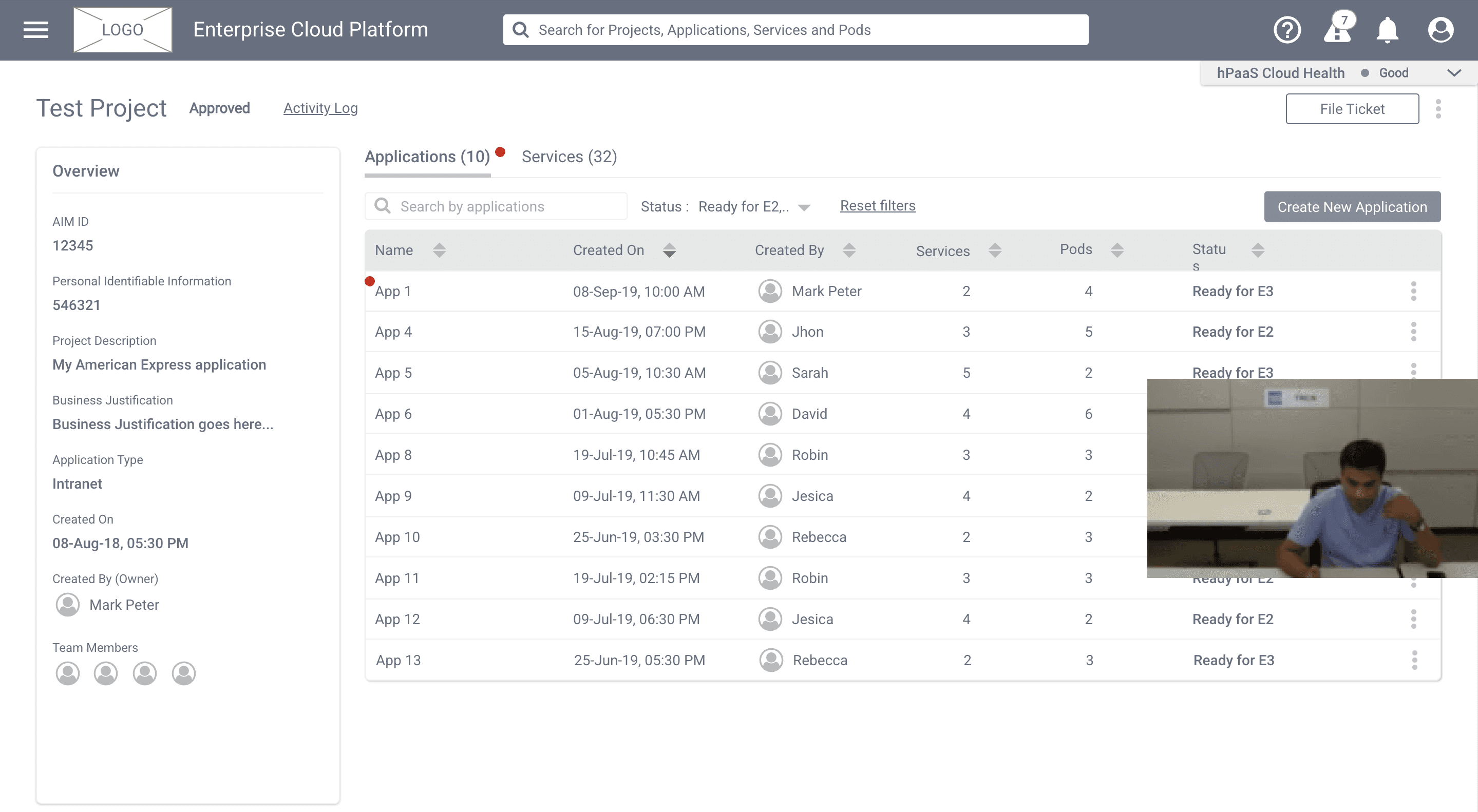
Fig 3.0: Usability testing with developer on the wireframes
🎨 VISUALS
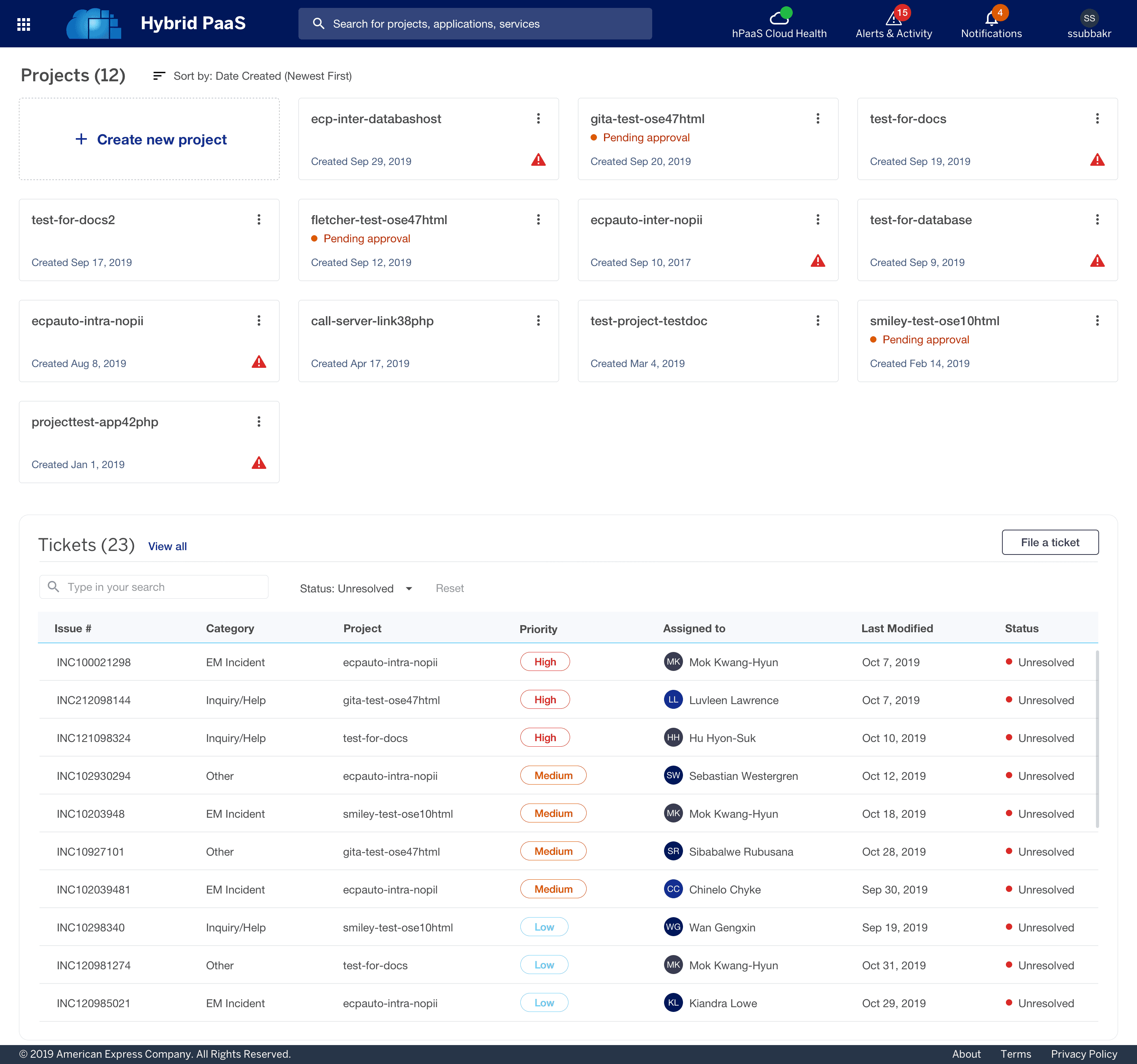
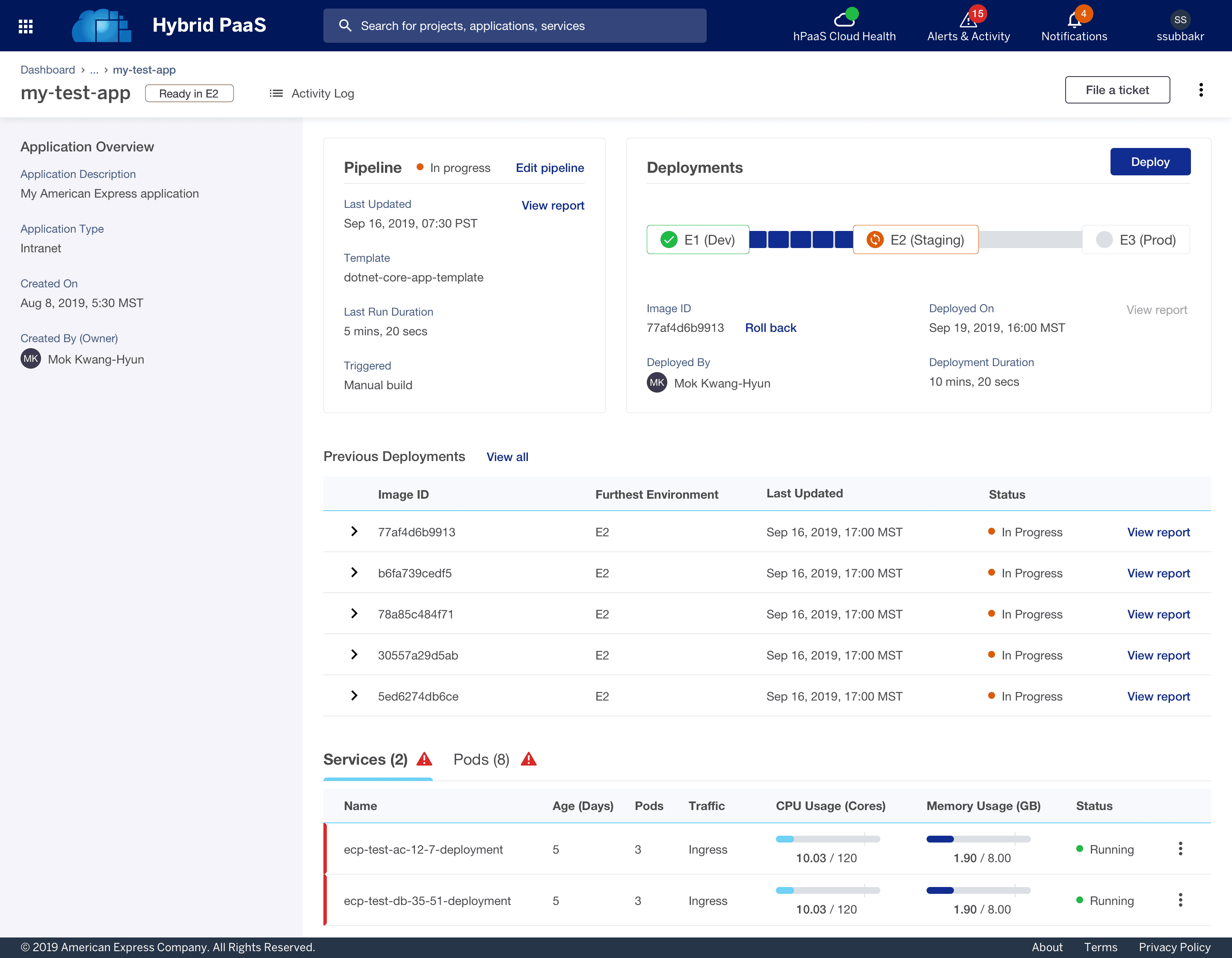
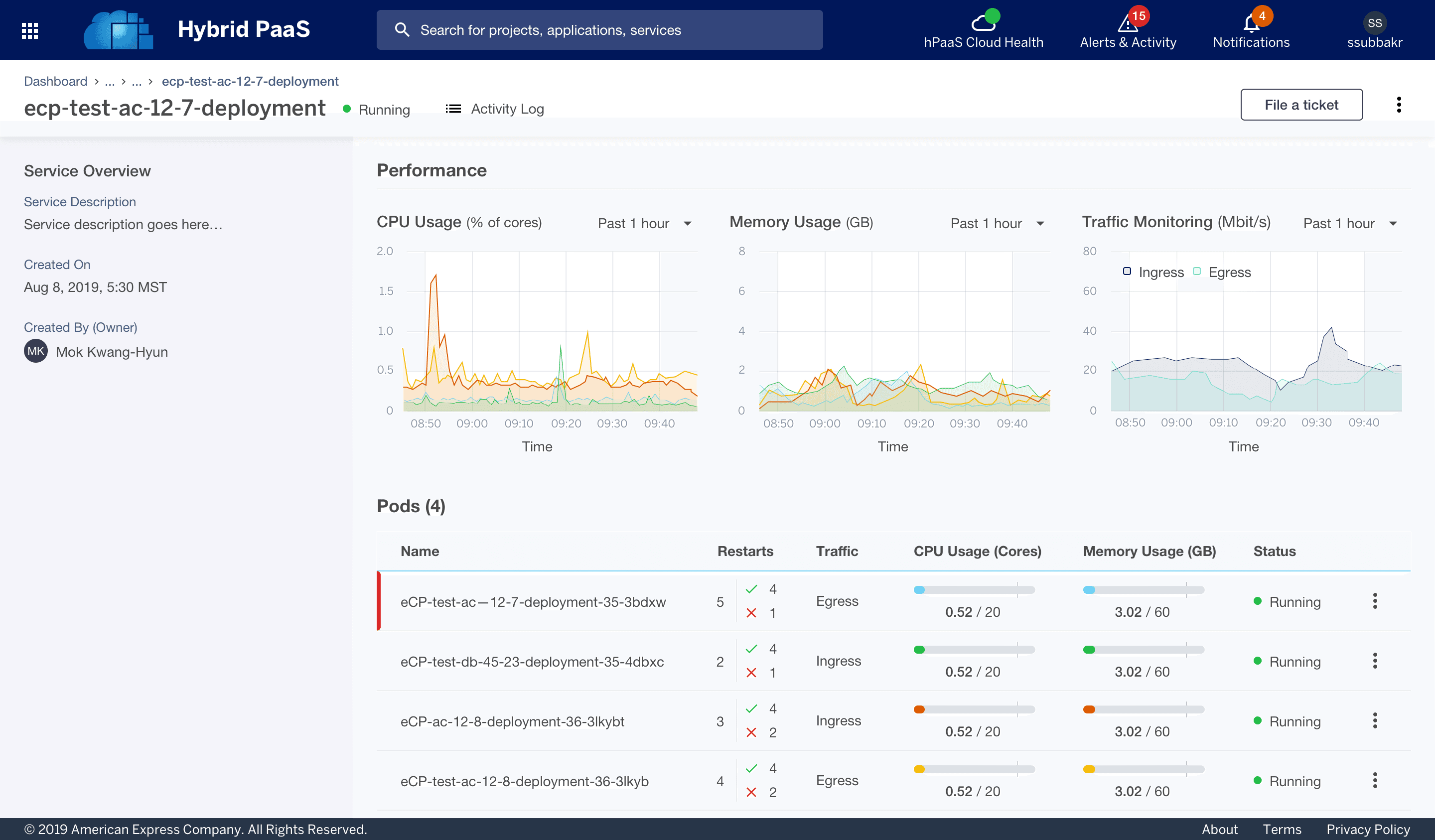
The legacy platform revealed critical usability and scalability issues. Addressing these pain points drove the redesign, delivering a faster, clearer, and more user-friendly experience.

NEXT STEPS
To ensure the new developer tool successfully enhances productivity and collaboration, the following metrics and features are prioritized for the next phase:
Track Support Tickets: Monitor the volume of tickets filed for preventable technical issues to measure the effectiveness of the new self-service documentation and health checks.
Evaluate Onboarding Time: Assess the time it takes for new developers to reach full productivity to validate if the redesign has successfully reduced the initial 1–2 month learning curve.
💡 WINNING MOMENTS & LESSONS LEARNED
Eliminating the "Black Box": To eliminate context-switching fatigue, we integrated Splunk data visualizations, ServiceNow ticketing, and Jenkins deployment pipelines into a single, cohesive dashboard.
Optimizing for Density: By testing Tabular vs. Kanban layouts, I learned that technical users value information density over minimalism; choosing the Tabular approach significantly improved scannability and reduced "Complexity Fatigue."
Proactive Issue Resolution: I implemented a global "System Health Check" in the top navigation and separated high-priority alerts from general notifications to ensure critical blockers are identified and resolved instantly.